Shipping labels look simple, but a poor match can disrupt a busy packing bench. This 2026 guide explores what makes a 4x6 Thermal Label practical for everyday shipping. We look at print clarity, adhesive, label format, and printer compatibility. The best option depends on your equipment, parcel surfaces, and shipping volume. A popular product is not always the right fit.
You’ll find clear comparisons of direct thermal and thermal-transfer printing, plus useful checks for roll cores, label gaps, and printer settings. We also explain why crisp text and scannable barcodes matter when parcels move through sorting systems. Small details matter. Product descriptions can be incomplete, so verify specifications with the label or printer manufacturer before ordering. Then test a small quantity on the packaging you actually use. Check that labels feed smoothly, stick firmly, and print legibly after handling. Test before scaling.
No single label suits every workflow. Humidity, surface texture, storage conditions, and printer calibration can affect results. This guide weighs those practical trade-offs without treating marketing claims as guarantees. Some recommendations may still need a real-world trial; that is worth acknowledging. The goal is to help you narrow the options, avoid preventable mismatches, and choose labels that support a steady, dependable shipping routine.
What 4×6 Thermal Shipping Labels Are and How They Work
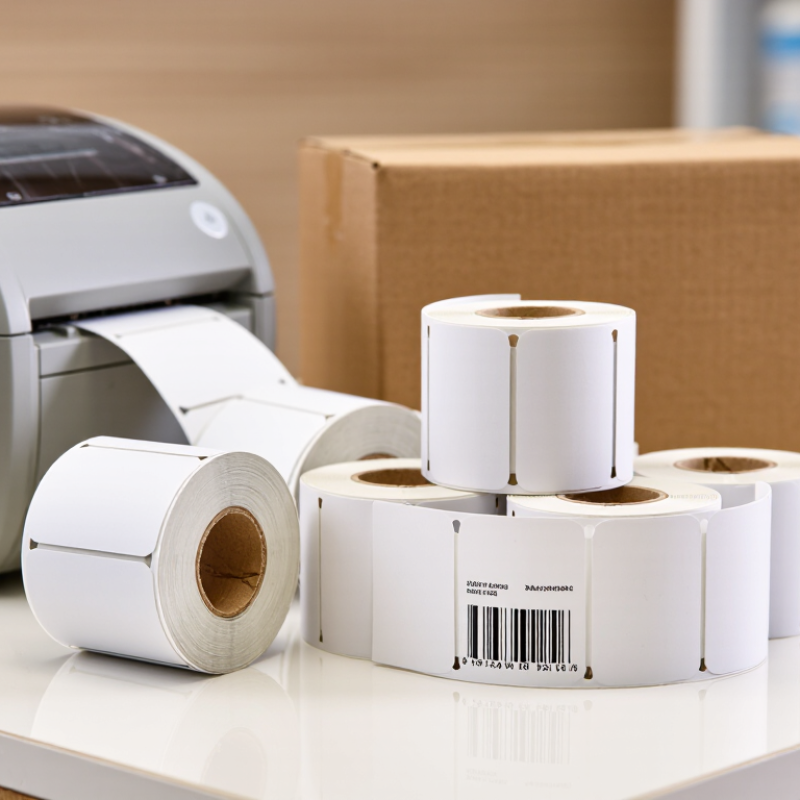
A 4×6 thermal shipping label is a sheet measuring four inches by six inches, sized for common parcel information. It usually has a paper face, heat-sensitive coating, and peel-away adhesive backing. A direct thermal printer uses a heated printhead to darken selected points on the coating. Those dots form text, tracking codes, and machine-readable barcodes. No ink is needed. The printer creates the image directly on the label, rather than transferring ink from a cartridge. Labels may come on rolls or fanfold stacks, so choose a format your printer accepts.
For clear printing, load the label squarely and set the page size to 4×6 inches. A mismatch can shrink an address, clip a barcode, or leave broad blank margins. Run a test label before printing a large batch. Check that the barcode has crisp dark bars and enough white space around it. Print darkness and speed matter: excessive heat can blur small text, while too little heat makes marks pale. Settings vary with the printer and label coating, so testing is more reliable than copying someone else’s numbers. Thermal paper can fade with heat, sunlight, or friction; store unused labels somewhere cool and dry. Adhesive strength and liner dimensions also affect feeding, not just sticking. Worth checking. Even a correctly sized file can feed slightly off, since label stock is not perfectly uniform.
Key Specifications: Adhesive, Material, Roll Core, and Perforation
2026 Best 4x6 Thermal Labels for Shipping?
For 2026 shipping workflows, the best 4x6 thermal label is the one that feeds reliably and stays readable in transit. Check the adhesive against your packaging: standard permanent adhesive suits clean, dry corrugated cartons, while cold or dusty surfaces may need a stronger formulation. Test a few labels on actual boxes before ordering a large roll. Small details matter. A label that lifts at the corners can snag during handling.
Material affects durability. Coated paper works well for routine indoor shipping, but moisture, friction, and long storage can fade or scuff printed details. Synthetic stock can resist tougher conditions, though it may cost more and require printer-setting adjustments. Match the roll core to your printer’s holder, and verify the outer roll diameter fits the compartment. Core sizes are not interchangeable. Perforations between labels make hand tearing easier; continuous rolls may suit printers with cutters. One imperfect fit can waste time across a busy packing shift.
How to Check Printer and Carrier Compatibility
2026 Best 4x6 Thermal Labels for Shipping? How to Check Printer and Carrier Compatibility
A 4×6-inch label measures 101.6 × 152.4 mm, but the size alone does not guarantee a clean, scannable print. Check that the printer supports direct thermal media and can print across the full four-inch width. Match the label stock to its feed sensor: gaps between labels and black marks require different settings. Then print a test and inspect the edges, barcode, and address. No clipping. A 2024 Parcel Shipping Index estimated 22.37 billion U.S. parcels moved in 2023, underscoring how routine label handling is at scale. That figure is context, not proof that any one label format suits every shipment.
Next, compare the shipping software’s selected service with the carrier’s current label instructions. Keep the label at its original scale; “fit to page” can shrink barcodes or shift their quiet zones. Check that the service accepts the label layout, then scan a test label using a handheld scanner or phone. A readable screen preview is not enough. A quick desk test is imperfect, too: worn printheads, damp stock, or a wrinkled corner can change results after printing. That part is easy to overlook. For traceable checks, record the printer model, media type, driver settings, and test date, and consult the carrier’s latest specifications before changing workflows.
2026 Best 4x6 Thermal Labels for Shipping? – How to Check Printer and Carrier Compatibility
Compatibility Check
What to Verify
Practical Guidance
Label dimensions
A 4 × 6 in label measures 101.6 × 152.4 mm.
Confirm the printer supports media at least 4 in wide and can feed the 6 in label length. Check whether the printer’s printable area leaves enough room for the complete label layout.
Printing method
Direct thermal or thermal transfer
Direct thermal labels are heat-sensitive and need no ribbon. Thermal transfer printing uses a ribbon and requires labels suited to that process. Check the printer manual and label specifications before ordering.
Label backing and detection
Die-cut labels with a gap, or labels with a black mark
Match the label’s registration style to the printer’s supported media sensor. If the sensor can be adjusted, follow the printer’s instructions and calibrate after loading a different label type.
Roll or fanfold format
Roll core, roll outside diameter, or fanfold stack size
These limits vary by printer. Check the device’s supported core sizes, maximum roll diameter, and feed path; do not assume every 4 × 6 roll will fit.
Printer setup
Page size, orientation, scaling, and print density
Set the document to 4 × 6 in and the correct orientation. Disable unintended “fit to page” scaling, then print a test label to check alignment and clipping.
Carrier acceptance
The carrier’s current label instructions and shipment service requirements
A 4 × 6 format is widely used for parcel shipping, but requirements can vary by carrier, service, and label type. Check the instructions provided with the shipping label rather than relying on size alone.
Barcode readability
Sharp, complete, high-contrast barcode printing
Keep barcodes unobstructed and avoid smudging, creases, or low contrast. Check a sample at actual size and ensure the printed label is not cropped or distorted.
Adhesive and surface
Adhesive suited to the package surface and handling conditions
Test adhesion on the intended carton, mailer, or packaging material. Apply to a clean, dry surface and smooth the label flat, especially around barcode areas.
Storage and durability
Expected exposure to heat, light, moisture, and abrasion
Direct thermal print can darken or fade with environmental exposure. Choose label stock and storage conditions appropriate to the shipment’s expected handling and transit period.
Selection rule: choose a 4 × 6 label that matches the printer’s media type, sensor, and roll or stack limits, then verify the carrier’s current label instructions and test-print for barcode clarity.
How to Compare 4×6 Shipping Labels for 2026
A good 4×6 shipping label comparison starts with printer fit, not price. Check the printer’s supported label width, roll or fanfold feed, and core size before ordering. A label that feeds crookedly can waste time, even when its dimensions look right on paper. Small details matter.
Compare the face stock, adhesive, and backing together. Thermal coating should produce dark, readable barcodes at your printer’s normal settings. Adhesive needs to hold on the actual cartons you ship, including textured or slightly dusty surfaces. Test a few labels on your own packaging. Press one down, leave it overnight, then check the corners. A quick peel test is not enough.
Look at perforations, liner stiffness, and how easily labels separate during packing. If parcels sit in heat, cold, or damp conditions, test samples in those conditions too; performance can vary by material and storage. Ask for clear specifications, such as label dimensions and roll count, rather than relying on vague claims. I’d also compare a small sample run before buying in bulk. It is a little slower, and not every test will be perfectly controlled, but it can reveal feed or scan problems that a product sheet misses. The cheapest option may still be the right one, if it works consistently with your printer and workflow.
Choosing the Best Label Type for Each Shipping Use Case
2026 Best 4x6 Thermal Labels for Shipping?
Choosing the best label type starts with the parcel’s journey, not just its printer. For everyday boxes moving through dry, indoor networks, direct thermal paper is often a practical choice. It prints without a ribbon and keeps packing simple. Check that the label’s adhesive grips corrugated cardboard, especially if the box surface is dusty or recycled. A clean, firm press helps. Test one label before a busy dispatch run.
Parcels exposed to sunlight, heat, or repeated handling may need a more durable face stock. Synthetic labels can resist moisture and tearing better than standard paper, though they may cost more. Cold-storage shipments need adhesive rated for low application temperatures; ordinary glue can lift from a chilled box. That detail is easy to overlook. Printer compatibility matters too: confirm the roll or fanfold format, core size, and gap sensing before ordering.
There is no perfect stock. A cheaper paper label may work well for short, sheltered routes, but can fade during prolonged heat exposure. I would avoid choosing by price alone, though that is an easy habit when shipping costs rise. Match the label to the parcel surface, storage conditions, and expected transit time, then inspect a few delivered packages. Real results can differ from a specification sheet.